Connect Attio
Connect an Attio workspace with a scoped API key. The connector reads CRM records, lists, notes and tasks. It can also upsert records and list entries, create notes and tasks, and change task completion.
Create a workspace API key
- Sign in to the Attio workspace you want to connect. A workspace admin creates the token.
- Open Workspace settings, then Developers.
- Create a new access token and choose the scopes needed by your Tasks.
- Copy the key into the qbash credential form. Keep it out of Task code and run logs.
Attio documents token creation in Generating an API key. This connector uses workspace API keys. It does not register an OAuth app or run an OAuth consent flow.
Choose scopes
| Operations | Scopes |
|---|---|
| Identify the token | No additional scopes |
| List objects or object attributes | object_configuration:read |
| Query or get records | object_configuration:read, record_permission:read |
| Upsert records | object_configuration:read, record_permission:read-write |
| List lists or list attributes | list_configuration:read |
| Query list entries | list_configuration:read, list_entry:read |
| Upsert list entries | list_configuration:read, list_entry:read-write |
| Read notes | object_configuration:read, record_permission:read, note:read |
| Create notes | object_configuration:read, record_permission:read, note:read-write |
| Read tasks | object_configuration:read, record_permission:read, user_management:read, task:read |
| Create tasks or set completion | object_configuration:read, record_permission:read, user_management:read, task:read-write |
| List workspace members | user_management:read |
Grant write scopes only when a Task needs to change data. A workspace API key acts for the workspace rather than an individual member. See Attio's authentication guide.
Add the credential in qbash
- Open Connectors and select Attio.
- Add a credential with a name that identifies the workspace.
- Paste the workspace API key and save. qbash calls Attio's identify endpoint and requires an active token.
- Open the Task's Tools → Integrations settings and explicitly select this Attio credential.
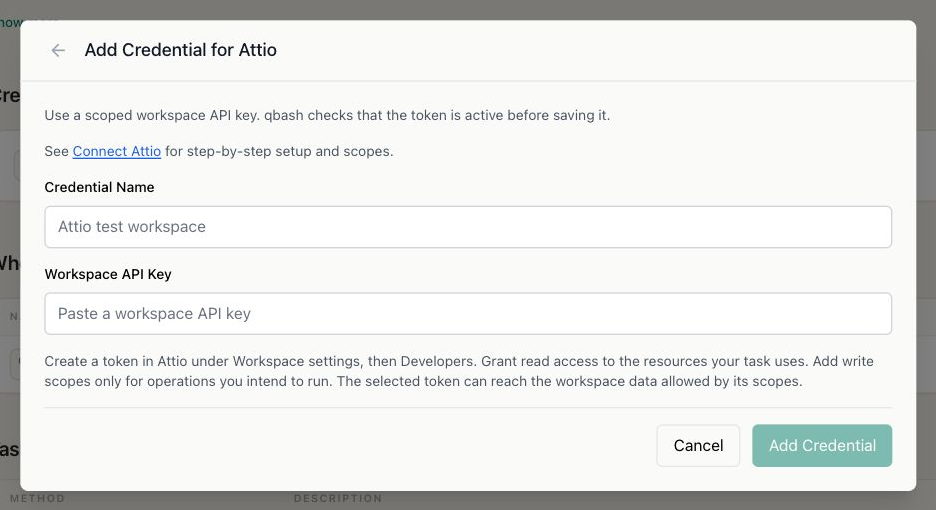
Saving a credential confirms that the token is active. Individual calls still require the relevant scopes. A permission error does not mean the token is invalid. When editing a credential, leave the key blank to keep it. Replacing the key runs the identity check again.
Read records in a Task
result = qbash.integrations.attio.list_records(
    object="people",
    limit=100,
)
qbash.output(result)
Each result contains records and next_cursor. Pass next_cursor as cursor with the same object, filters, sort and limit to read the next page. Continue until it is None. A full final page requires one more request, which returns an empty page. Each record query accepts 1 through 500 items, with a default of 100. Changes made while paging can shift offsets.
list_notes defaults to 10 notes per page and accepts at most 50. Attribute, record, entry and task listings use a connector default of 100 and a safety bound of 500.
Record values keep Attio's typed arrays. For example, an email address appears under record["values"]["email_addresses"], and a record UUID appears under record["id"]["record_id"]. Call list_attributes(target="objects", identifier="people") to discover attribute slugs. See the SDK Reference for every method and its arguments.
Prepare test data
Use a dedicated test workspace or a list of isolated fixtures. Create at least two people with distinct email addresses and add one to a test list. Attach a note and an Attio task to a fixture person. This provides data for record reads, pagination, list membership, note reads and task completion.
The repository's test-tasks/attio-test.py checks reads by default. Its optional writes require an explicit flag and a fixture email address. It leaves its fixtures in Attio for inspection. Remove them manually after testing.
Write behavior and limits
upsert_record matches on the supplied attribute. Prefer a unique attribute, such as email_addresses or domains. Attio rejects a match that finds several records. Supplied multiselect values overwrite existing values. upsert_entry matches list membership by its parent record and overwrites supplied entry attributes.
create_note and create_task can create duplicates if repeated. The connector does not automatically retry requests. After a transport error or service failure, check Attio before repeating a write. Task links accept explicit object and record UUIDs, and assignees accept workspace-member UUIDs.
Attio generally allows 100 read requests and 25 write requests per second. Listing notes has a separate temporary limit of 10 requests per second. Record and entry queries also have complexity limits. A 429 error includes Attio's Retry-After value when present. Wait before retrying, or simplify the query. See Handling rate limits.
The connector does not expose deletion, schema administration, webhook setup or Enterprise SQL queries.