







AI cloud functions.

Program AI automations.

Build reusable functions with Python, prompts and connected services. Run them from your applications, share them with your team, or give them to agents as tools.

brief = qbash.ai.run_prompt(
"company-brief",
{"company": qbash.inputs["company"],
"notes": qbash.inputs["notes"]},
)
qbash.integrations.slack.create_message(
channel=qbash.inputs["channel"],
text=brief,
)
qbash.output({"brief": brief})

Add the qbash MCP.

Build and run Tasks from Claude Code, Codex, Cursor and other MCP clients. Saved Tasks can also run on schedules or triggers.

claude mcp add --transport http qbash https://mcp.qbash.com/mcp

Then run /mcp in Claude Code and sign in with qbash.

Write the glue code you need in the AI world

Sync CRM records, reshape API responses and keep shared memory up to date.

qbash Tasks provide a Python runtime with built-in connectors.

This Task copies a contact’s phone number from Pipedrive to HubSpot. Add field mappings and validation, then run it on a schedule or when a record changes. The sync needs no model call.

person = qbash.integrations.pipedrive.get_person(
person_id=qbash.inputs["person_id"],
)["person"]
if person.get("phone"):
qbash.integrations.hubspot.update_contact(
id=qbash.inputs["contact_id"],
properties={"phone": person["phone"]},
)
qbash.output({
"updated": bool(person.get("phone")),
})
Build deterministic AI applications

Some work follows a known process but still needs judgement. AI makes it possible to think about that work as functions. A qbash Task defines the process in Python and brings AI into the steps that need it.

Keep the process, prompts and tests together. Build research reports, document-processing tools, classification and other applications that need judgement at specific steps.

findings = qbash.ai.run_prompt(
"analyse-posts",
{"posts": qbash.inputs["posts"]},
)
report = qbash.ai.run_prompt(
"write-report", {"findings": findings},
)
file = qbash.files.write(
report, name="research-report.md",
content_type="text/markdown",
)
qbash.output({"report": file})

Control access to critical systems

Tasks let you control how agents and end users interact with your systems. Put business rules, validation and limits inside a Task, then make that operation available as a tool or application.

Callers get only the functionality you expose. For example, let an agent find relevant correspondence in Gmail while leaving sending and deleting unavailable.

matches = qbash.integrations.gmail.search_messages(
query=qbash.inputs["query"],
max_results=5,
fetch_full=True,
)
qbash.output({"messages": [
{"from": email.get("from"),
"subject": email.get("subject"),
"snippet": email.get("snippet")}
for email in matches.get("messages", [])
]})

Build shared tools for your team

Maintain one company-brief Task. Teammates run it from a form; applications and agents call the same code over HTTP or MCP.

Schedules and service events can run the same Task in the background.

Claude CodeCodexChatGPTCursor
brief = qbash.ai.run_prompt(
"company-brief",
{"company": qbash.inputs["company"],
"notes": qbash.inputs["notes"]},
)
qbash.integrations.slack.create_message(
channel=qbash.inputs["channel"],
text=brief,
)
qbash.output({"brief": brief})
Also buildScheduled reportsWebhook handlersInbound email processingFile conversion

The official qbash MCP

Build and run Tasks from your chat or coding agent, then share them with your team across the tools they use. The official qbash MCP also connects your agents to shared Memories and your connected services.

claude mcp add --transport http qbash https://mcp.qbash.com/mcp

Then run /mcp in Claude Code and sign in with qbash.

Distribute and run anywhere

Work is spreading across more AI tools, and more of it is being handed to agents. qbash Tasks keep the underlying functions in one managed layer, with version control, logging and more.

People in their tools

ClaudeChatGPTSlackMicrosoft Teams

Systems and schedules

GmailGitHubJiraPipedrivePostgresGoogle Drive

Agents and agent teams

Claude CodeCodexCursorGrokMuse

Your qbash functions

read_gmail()triage_issue()sync_crm()research_company()query_records()classify_email()build_report()notify_customer()

Memories

Share persistent memory across your Tasks and agents. Store knowledge bases, project documents, bug reports and research in folders your team and agents can read and update.

Use the same documents across Claude Code, Codex, Cursor and other MCP clients. Tasks can also use those folders to store results and retain information between runs.

Explore Memories

Build custom MCP servers

Create custom MCP servers combining memories, qbash Tasks and connector actions

  • Build shared memory for your agents. Make selected documents and folders available across Claude Code, Codex and other tools, with read or write permissions.
  • Create shared servers for your team. Give teammates a shared set of Tasks, memory folders and approved connector actions through the tools they already use.
  • Give agents a limited set of tools. Choose which Tasks and connector actions a server exposes. For example, permit Gmail lookups while leaving send and delete actions unavailable.
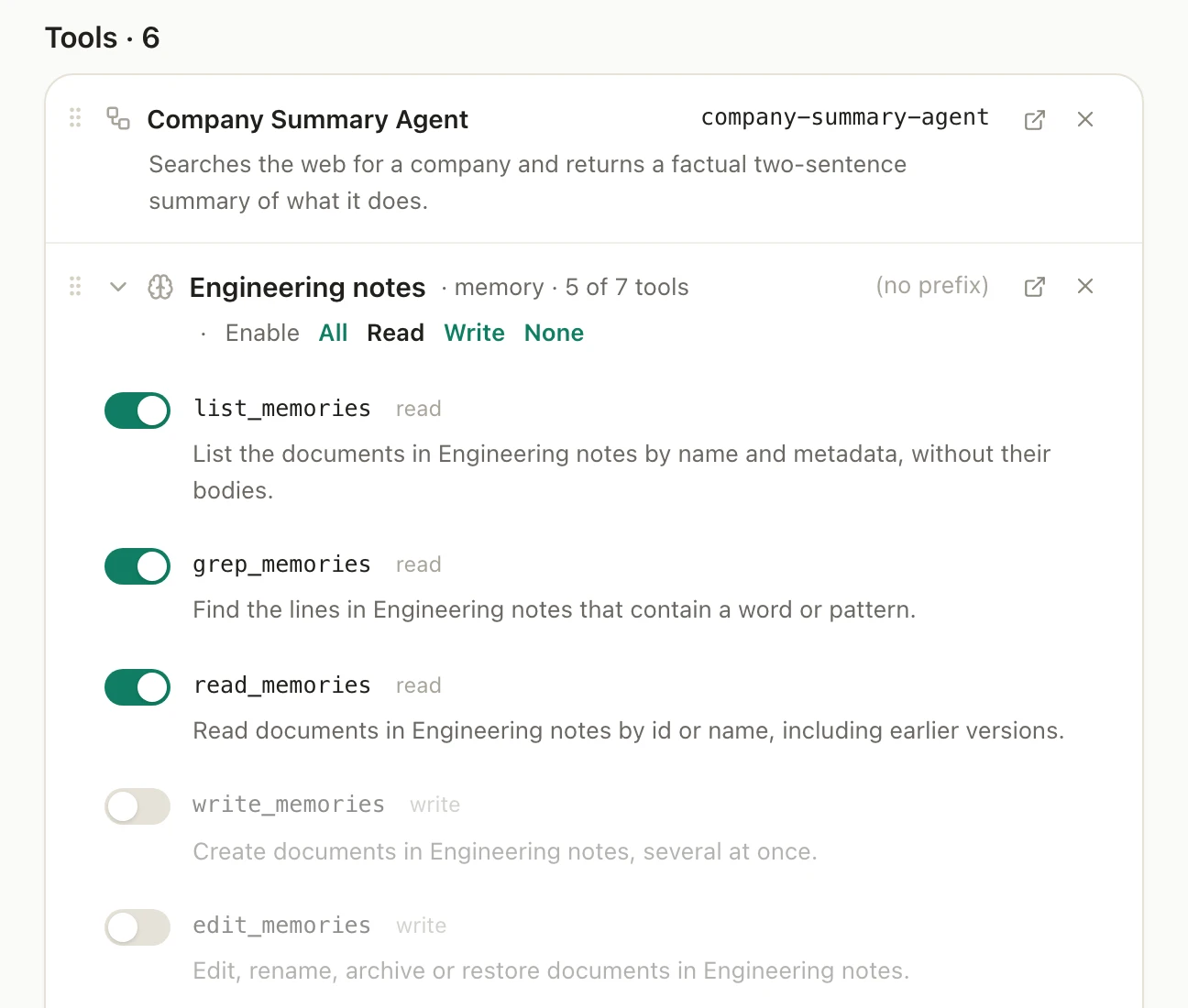
Custom MCP server tools: the Company Summary Agent Task and the Engineering notes memory folder with read tools on and write tools off
Choose the resources, then the actions.

qbash Tasks

Build applications from Python, prompts and connected services. Use your coding agent over MCP or the qbash editor’s AI builder and test-run console. qbash hosts and runs the finished Task, with the qbash SDK included.

Inline prompts: qbash Tasks store prompts, variables, model settings and structured outputs with the application. Call a prompt by name where a step needs judgement, then test it or change models without rewriting the process. Provider tools such as search and page fetching are available where supported.

AnthropicOpenAIGeminiTypeSafexAIOpenRouterAmazonPerplexityMoonshotAIMetaQ
  • Version control

    Version code, prompts, inputs and settings together. Compare changes or roll back.

  • Managed Python runtime

    qbash hosts execution and maintains the supported Python packages and runtime.

  • Durable runs

    Set retries, timeouts and concurrency. Checkpoints reuse completed results on retry.

  • Run history and logs

    Inspect the version, status, result and logs, including what started each run.

  • A test harness

    Check functions or the full script in tests.py with mocked platform calls.

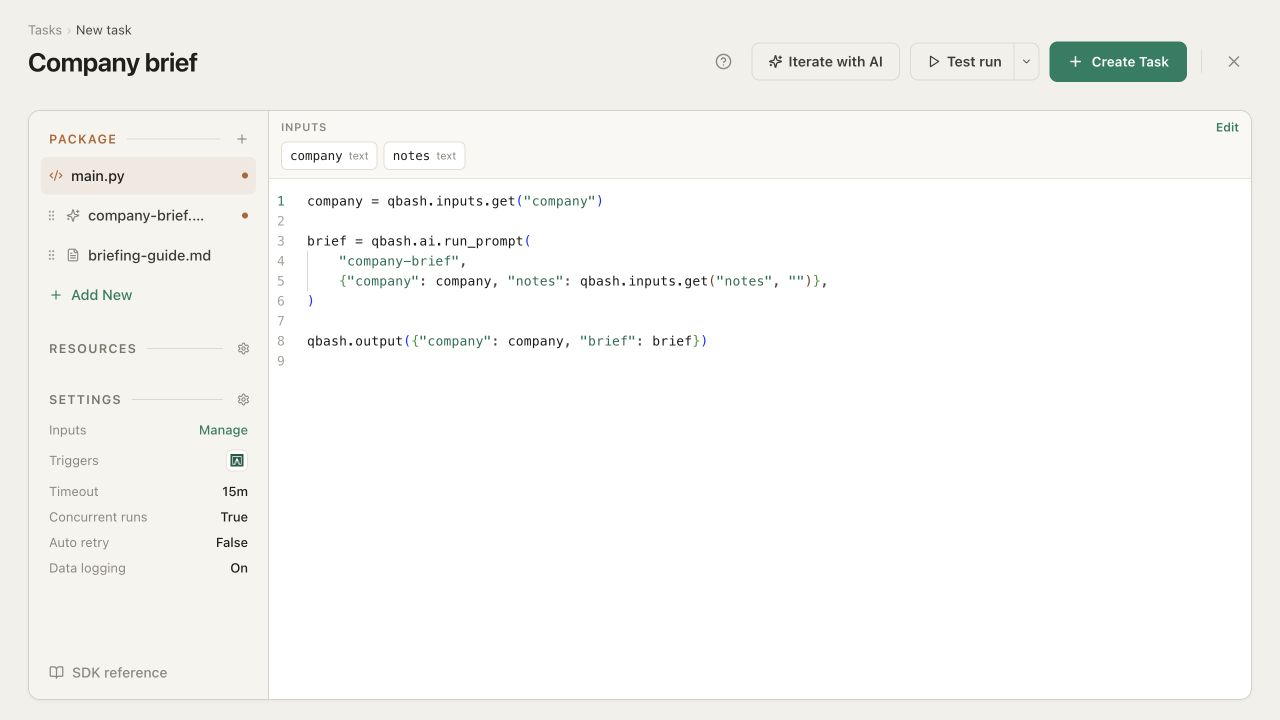
qbash Task editor showing Python, resources, the AI builder and Test run
Task editor and AI builder ↗

Checkpointing

A retry starts the script again. Save a completed result so the next attempt of that run can reuse it. This analysis runs again only if its checkpoint has not been saved.

Reuse the analysis on retryPython
findings = qbash.checkpoint.get_or_set(
"post-analysis",
lambda: qbash.ai.run_prompt(
"analyse-posts",
{"posts": qbash.inputs["posts"]},
),
)

Caching

Share a result across separate runs of the same Task for a chosen time. This lookup caches each contact for ten minutes, using its ID as part of the key.

Reuse a contact lookup for ten minutesPython
person_id = qbash.inputs["person_id"]
person = qbash.cache.get_or_set(
f"person:{person_id}",
lambda: qbash.integrations.pipedrive.get_person(
person_id=person_id,
)["person"],
ttl="10m",
)
More in the SDK
ModuleWhat you can do
qbash.aiCall a named prompt with its own instructions, variables, model and output format. Use different models for different steps, with prompt settings saved alongside the code.
qbash.integrationsRead and update connected services through direct API calls. qbash uses the accounts attached to the Task and handles authentication on the server. These calls do not need a model.
qbash.filesRead uploaded or generated files, write results and return download links. Parse documents and spreadsheets or pass their contents into a prompt.
qbash.memoriesSearch shared documents and store findings for later runs, other Tasks or agents. Folder permissions and review settings govern updates.
qbash.http · secretsCall an HTTP API when there is no connector. Attach a Secret for authentication and use the response status, headers and body in the next step.
qbash.inputsRead the typed values supplied by the caller or trigger. Input declarations also create the run form, including credential fields that let a runner choose an account.
qbash.parallelRun a function across a list with limits on concurrency and request rate. Set retries and an optional checkpoint name so completed items can be skipped on retry.
qbash.powerpointFill placeholders in a PowerPoint template while preserving its formatting. Generate a recurring deck from the template your team already uses.
qbash.chatsSearch and read the chat history of the person running the Task. The run form shows a consent banner, and access is limited to that person’s threads.
qbash.runRead the current run’s identity, caller, timestamps and test flag. Use last_run_at, the previous successful run’s time, to select records for an incremental process.
Full SDK reference

Build deterministic AI applications

Some work follows a known process but still needs judgement: reviewing documents, classifying requests or turning research into a report. AI makes it possible to think about this work as functions.

A qbash Task defines the process in Python and brings AI into the steps that need it. The Task keeps the process, prompts and tests together, so you can version and improve the whole application as one unit.

Python

Read the transcript

Load the source and identify the company.

Inline prompt

Extract the facts

Pull out products, customers and problems.

Python

Check the fields

Validate the structure and flag missing details.

Inline prompt

Write the profile

Draft the profile from the checked facts.

qbash Tasks versus agents

qbash Tasks encode a defined process in code. Agents reason through the problem again each time they run. Tasks work well for repeatable processes: they are easier to review and test, and they avoid spending tokens rediscovering the same steps.

The same job: read Jira tickets in a date range, classify each ticket’s team and priority, and update both fields.

Jira triage as a Task

tickets = qbash.integrations.jira.get_tickets_by_time_span(
start_date=qbash.inputs.get("since"),
)["tickets"]

for ticket_id in tickets:
issue = qbash.integrations.jira.get_ticket(ticket_id=ticket_id)["ticket"]
triage = qbash.ai.run_prompt(
slug="triage-issue", variables={"issue": issue},
)
for field_id, tag_name in {
"labels": triage["team"],
"priority": triage["priority"],
}.items():
qbash.integrations.jira.update_ticket(
ticket_id=ticket_id, field_id=field_id,
tag_name=tag_name,
)

Jira triage as instructions for an agent

Go through our open Jira issues that have no team assigned. For each one, read it, decide which of our twelve teams should own it and how urgent it is, then update the issue. Keep going until everything is triaged.

Oh, and if an issue looks like a duplicate, link it to the original instead of assigning a team. If you cannot tell which team owns it, drop it in the triage backlog with a short note on why. Skip anything already assigned, do not touch closed issues, and if something looks like an outage, mark it urgent and post a heads-up in the incidents channel.

Before changing anything, confirm the issue is still open and unassigned. Preserve its description and existing labels. When the run is complete, report how many issues were assigned, sent to the backlog, linked as duplicates or escalated as incidents, and list anything you could not process.

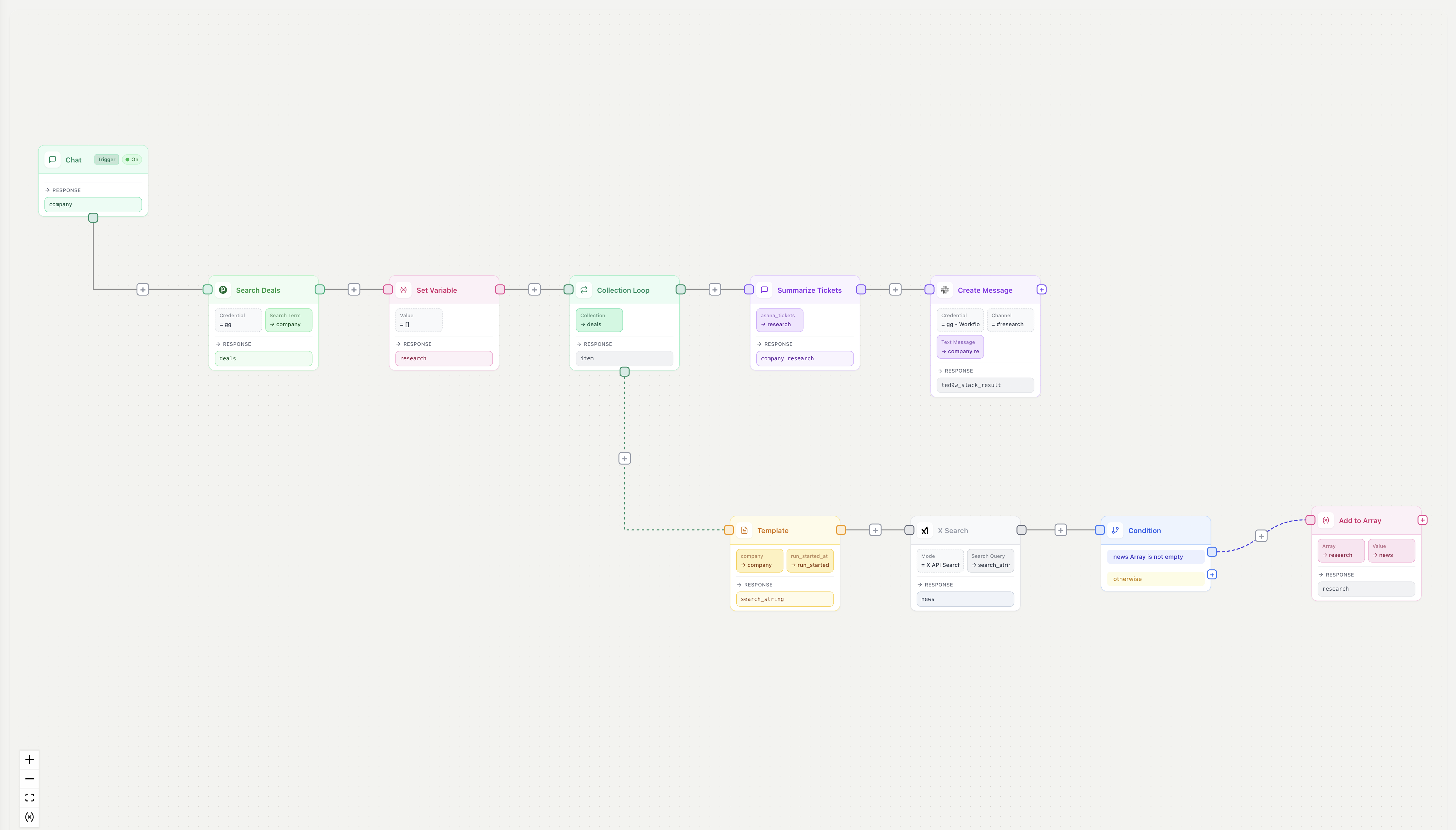
Easier to maintain than a node graph

Account brief as a Task

company = qbash.inputs.get("company")
deals = qbash.integrations.pipedrive.search_deals(
term=company,
)["deals"]

research = [
{"deal": deal, "news": qbash.ai.gemini_google_search(
f"{company} news since {qbash.run.last_run_at}"
)}
for deal in deals
]

brief = qbash.ai.run_prompt(
slug="account-brief",
variables={"research": research},
)
qbash.integrations.slack.create_message(
channel="#revenue", text=brief,
)

The same account brief as a node graph

Account-brief workflow with deal search, company news, looping and Slack output

Search deals, gather company news and send a brief to Slack.

Build a Task.

Write the program, or describe it to the builder or your coding agent.