Build an SEO MCP using your Search Console and GA4 data
Connect Search Console and GA4 in qbash, then ask Claude or ChatGPT to build an SEO Task. It runs on qbash and shows up as a tool in your chat.

SEO answers based on your site’s traffic and keyword priorities
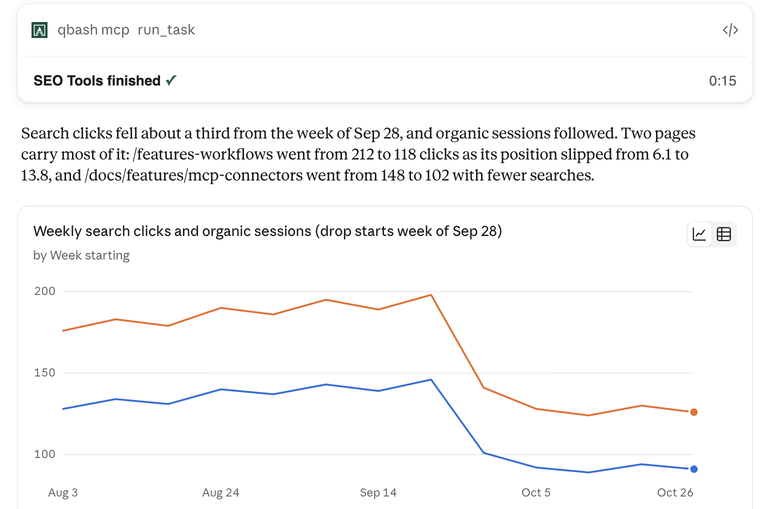
- The SEO Task reads your connected accounts on each run to find pages to improve and investigate changes in search traffic.
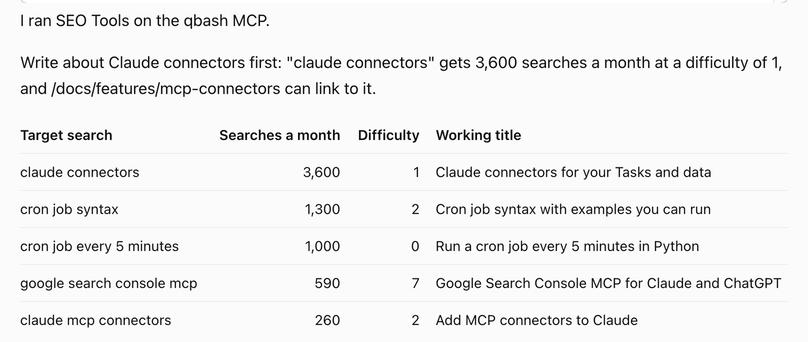
- It reads your saved keyword priorities before suggesting what to write, and looks up monthly search volume in Google Ads Keyword Planner.
qbash Tasks are AI cloud functions
A Task is an AI cloud function written in Python that qbash hosts on secure cloud infrastructure.
You can write a Task yourself, or describe it in Claude or ChatGPT and the qbash task builder writes it.
# Read Search Console, then one inline prompt.
site = qbash.inputs.get("site_url")
end = qbash.dates.today()

rows = qbash.integrations.google_search_console.query_search_analytics(
    site_url=site, start_date=str(end - timedelta(days=28)),
    end_date=str(end), dimensions=["page", "query"], row_limit=40,
)["rows"]

answer = qbash.ai.run_prompt(slug="seo-fix-this-week", variables={"rows": rows})
qbash.output(answer)- Inline prompts
- Each inline prompt has its own model and settings. The Task calls it at the step that needs AI.
- Version control
- Every save of the Task and its prompts is a version you can compare or restore.
- Logging
- Each run records its inputs, output, status, logs and trigger.
- Connected accounts
- Search Console and GA4 connect with Google’s read-only access.
qbash Memories is a shared knowledge base for your AI tools
A memory folder holds Markdown documents and uploaded files that Claude, ChatGPT and your Tasks can read and update. The documents live in qbash, where you can edit them and review their history.
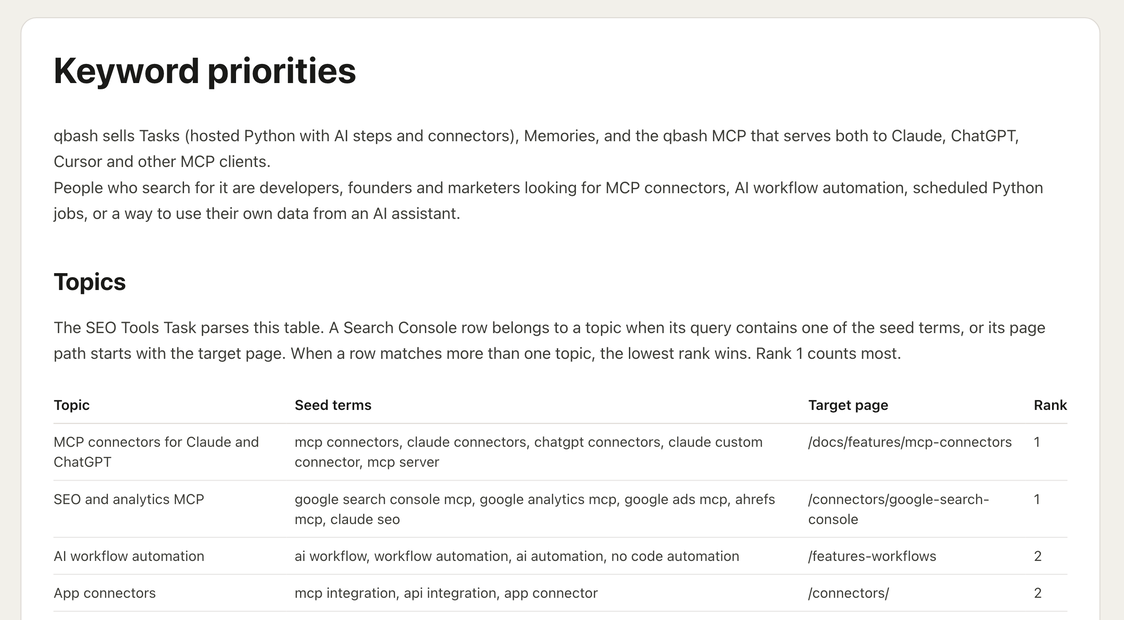
For SEO, the Task can read your target keywords, the page you want to rank for each one, and your rules for writing titles. You can update those documents as your priorities change.
Read the Memories docsSEO checks run from your chat or on a schedule
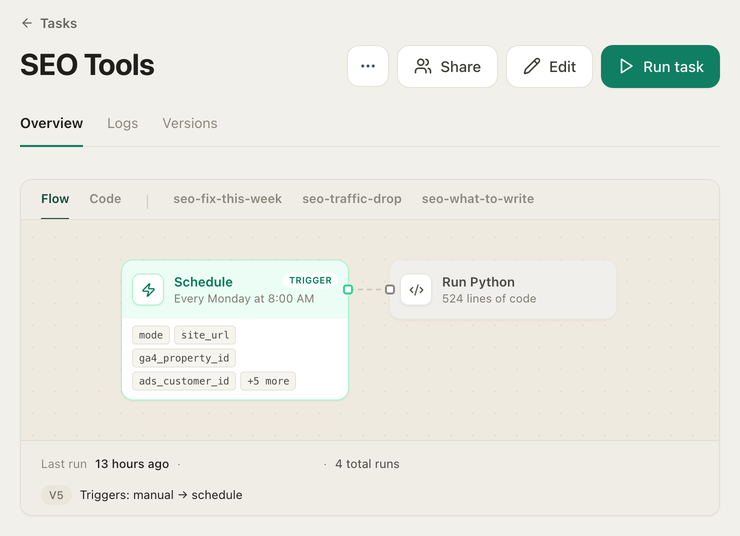
You can run the same SEO Task from Claude, ChatGPT or another MCP client. A scheduled Task can check your search traffic every week, even when no chat is open.





- Webhook and API
- A POST from your own app or site starts a run. The API returns the result, and the webhook runs the Task in the background.
- Slack and email
- A Slack message or mention starts a run, and so does a new email in Gmail or Outlook.
- Google News and SERP
- New articles that match the topics or keywords you track start a run.













Questions
Do I need to write code?
The qbash task builder writes the Python from what you describe in Claude or ChatGPT. You can read and edit the code in qbash, or ask Claude or ChatGPT to change it.
Is there a free plan?
The free plan includes Task runs and access to all connectors, with no credit card required. The pricing page lists current run allowances and paid plans.
Which accounts can an SEO Task use?
Any account you connect in qbash. An SEO Task can read Search Console and GA4, get keyword search volume from Google Ads Keyword Planner, or use Ahrefs with your own API key.
Can a Task change my site or my ads?
A Task can use any operation its connectors offer, including writes. The WordPress connector can create and update posts, and the Google Ads connector can manage campaigns, budgets, ad groups and ads. A dry run holds back writes. You can inspect what it would change before starting a production run.
Can I inspect how a Task reached its answer?
The run log shows the Task’s steps and their results. You can inspect the data returned by a connector alongside the prompt that used it.
Can a Task check pages on my site?
A Task can fetch public pages and use an inline prompt to review their content. The Search Console connector can inspect a URL’s indexing status and read your sitemaps.
Does it work in ChatGPT?
ChatGPT can build and run qbash Tasks through the qbash MCP. The setup card below has the connection instructions.
Do I need a Google Cloud project?
Search Console and GA4 connect through qbash’s Google app. You sign in with Google and choose the account to connect.
Can I build Tasks for more than SEO?
The task builder can create Tasks for other jobs, such as a weekly digest of Reddit posts about your product. You run them through the same qbash MCP or on a schedule.
Add the qbash MCP
Connect with OAuth
 ChatGPT
- 1In ChatGPT, open Plugins in the left sidebar, click "Add", and choose "Add custom MCP server".
- 2Enter a name, paste
https://mcp.qbash.com/mcpas the server URL, choose OAuth, and click "Create as a plugin". - 3Install the plugin from the Personal tab and complete the qbash sign-in.
- 4In a new chat, type @ and pick the plugin by its name.
Any personal plan can add one, including Free. In a Business, Enterprise or Edu workspace, if the option isn't there, talk to your workspace owner.
qbash is free to start, with no card needed
Your first SEO Task can find pages to improve using your Search Console data.