qbash Tasks are AI cloud functions that run on a schedule
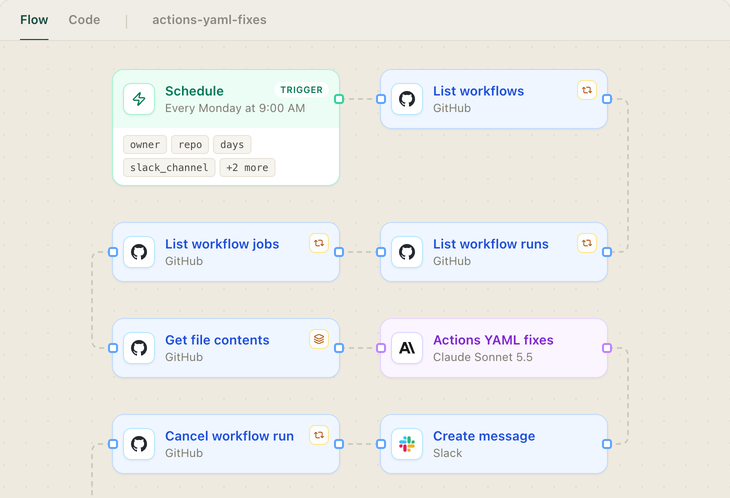
A Task is an AI cloud function written in Python that qbash hosts on secure cloud infrastructure. qbash connects the accounts a Task uses, such as GitHub and Slack.
- Inline prompts
- Version control
- A log of every run
- A weekly schedule
Calculate your workflow costs with a Task that measures job times
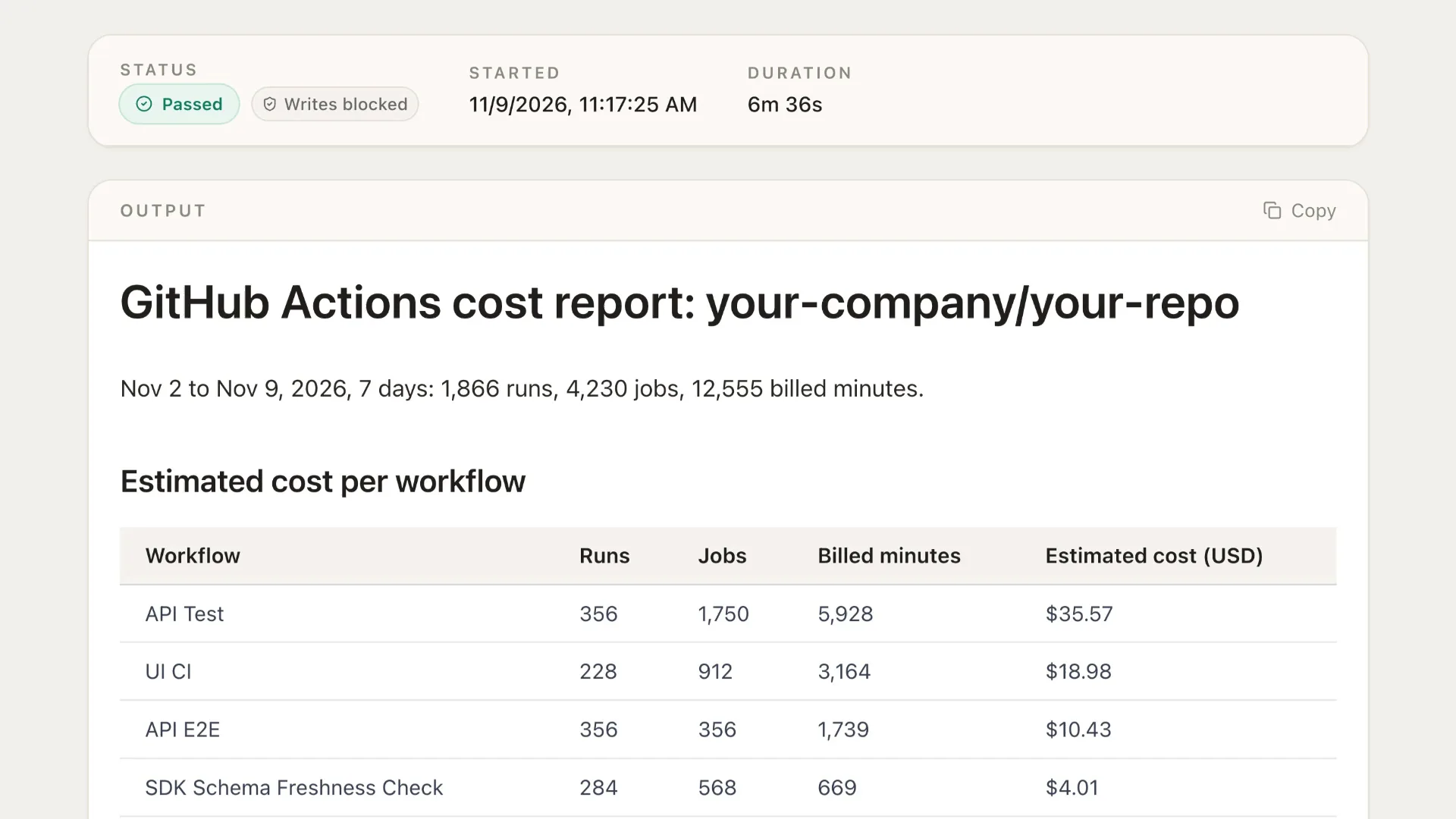
Every week, the Task reads workflow runs and their jobs via the GitHub connector, and calculates the time of each job rounded up to the nearest minute, and prices that at GitHub’s published rates. For a more accurate read, you could pull your plan’s included usage from the GitHub billing API.
RATES_PER_MINUTE = {
    "ubuntu": 0.006,        # Linux 2-core (ubuntu / linux)
    "linux": 0.006,
    "windows": 0.010,
    "macos": 0.062,
    "ubuntu-arm": 0.005,
    "4-core": 0.012,        # larger runners, where the label names a core count
    "8-core": 0.022,
    "16-core": 0.042,
    "32-core": 0.082,
    "64-core": 0.162,
    "96-core": 0.252,
    "self-hosted": 0.0,     # no GitHub cost
}

# ...

    for j in run.get("jobs", []):
        sec = j["sec"]
        cat, rate, unk = classify(j["labels"])
        nj += 1
        if unk:
            unknown_labels.add(unk)
        if cat == "self-hosted":
            self_hosted["jobs"] += 1
            self_hosted["seconds"] += sec
            continue  # no GitHub cost; not billed minutes
        billed = int(math.ceil(sec / 60.0)) if sec > 0 else 0
        billed_total += billed
        cost_total += billed * rate
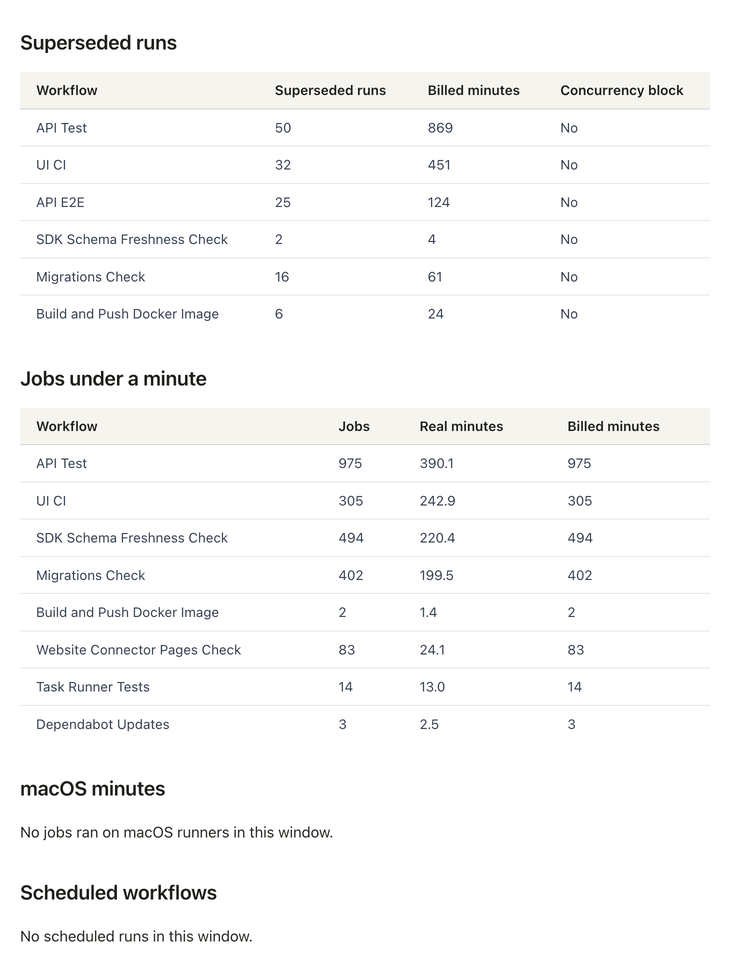
The report finds the minutes spent on runs nobody needed
Our example Task also looks for optimizations: it details superseded runs where a newer push to the same branch starts the same workflow before the previous run finishes, and reports the jobs that are impacted the most by rounding, or more expensive runtimes.















Questions
Does the report match my GitHub bill?
It won’t match exactly. The Task prices job durations at GitHub’s list rates and never reads the billing API, so included usage, free minutes on public repositories and discounts are left in.
How is this different from GitHub’s Actions Usage Metrics?
Actions Usage Metrics, under Insights, shows minutes by workflow, job, repository, operating system and runner type. The Task turns those minutes into an estimated cost per workflow, finds the superseded runs and short jobs, and writes a YAML change for each one.
Can the Task cancel runs or change workflow files?
Only after you turn those inputs on. It can cancel superseded runs that are still going and open a pull request that adds concurrency blocks. A dry run lists both writes without sending them.
How are self-hosted runners counted?
GitHub’s billing documentation lists self-hosted runner minutes as free, so the report shows them with no cost estimate.
The qbash MCP lets Claude Code, Codex and Cursor build and run the Task
The official qbash MCP exposes tools such as build_task, run_task and get_task_result. Claude Code built the cost report Task in two messages to the Task builder and runs it on demand.
Connect with OAuth
 ChatGPT
- 1In ChatGPT, open Plugins in the left sidebar, click "Add", and choose "Add custom MCP server".
- 2Enter a name, paste
https://mcp.qbash.com/mcpas the server URL, choose OAuth, and click "Create as a plugin". - 3Install the plugin from the Personal tab and complete the qbash sign-in.
- 4In a new chat, type @ and pick the plugin by its name.
Any personal plan can add one, including Free. In a Business, Enterprise or Edu workspace, if the option isn't there, talk to your workspace owner.
qbash runs the GitHub Actions cost report every week
Each report sets the week’s estimated cost per workflow next to the YAML changes for the wasted minutes.