Make, Pipedream and Power Automate alternative
You can rebuild a workflow from Make, Pipedream or Power Automate as a qbash Task. The qbash AI builder drafts the Python from the old workflow and an example input, and qbash hosts and runs the Task.

What is changing for Pipedream workflows
Pipedream is deprecating its workflows feature by March 31, 2027, and deleting all workflow data, including connected-account credentials and tokens, by April 30.
All Pipedream workflows, and accounts they’re connected to, need to go somewhere. qbash is a great replacement for your Pipedream workflows, as well as Make workflows, and Power Automate automations.
qbash Tasks are hosted Python functions with inline prompts
A Task is an AI cloud function written in Python that qbash hosts on secure cloud infrastructure. Steps, logic, and integrations can be written in python, and with the qbash sdk.
You can hand over whatever artifacts you have of your existing workflows, along with example inputs and outputs, and the qbash Task builder can draft all of the code, write the necessary AI prompts, connect to your 3rd party platforms, and write proper test cases for you to review.
Here’s an example Task that collects a form submission, formats it, inserts a row into a google sheet, and messages a slack channel.
email = qbash.inputs.get("email", "").strip().lower()
company = qbash.inputs.get("company", "").strip()
message = " ".join(qbash.inputs.get("message", "").split())

result = qbash.checkpoint.get_or_set(
    "label",
    lambda: qbash.ai.run_prompt(
        "label-submission",
        {"email": email, "company": company, "message": message},
    ),
)

if result["label"] != "spam":
    qbash.checkpoint.get_or_set(
        "sheet-row",
        lambda: qbash.integrations.google_sheets.append_values(
            spreadsheet_id=qbash.inputs.get("sheet_id"),
            range="Submissions!A1",
            values=[[email, company, result["label"], result["summary"], message]],
        ),
    )
    qbash.integrations.slack.create_message(
        channel="#demo-qbash",
        text=f"New {result['label']} submission from {company}: {result['summary']}",
    )

qbash.output(result)
- Inline prompts that the Task calls at the steps that need a model
- Version control, with every save kept as a version you can compare or restore
- A log of every run
- Secrets for API keys, encrypted so nobody can view the value after saving
Tasks can be triggered by Webhooks, schedules, and app events
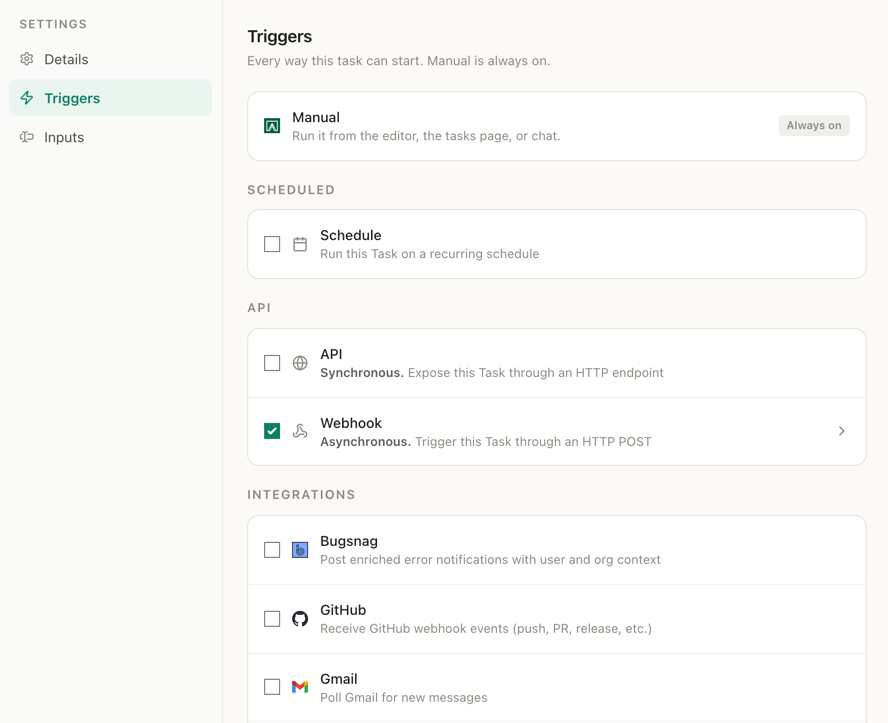
A Task can start in several ways, and each one is set in the Task’s Settings under Triggers. A form or another system can trigger it with an HTTP request to the Task’s own webhook URL, and get a task run ID back while the Task keeps running. Tasks can also run on a schedule, run when new email arrives in Gmail or Outlook, or when something happens in Slack, Microsoft Teams, GitHub or another connected app.
In the example, the form posts to the Task’s webhook, and the Pipedream trigger is paused until the Task goes live.












qbash Tasks have smarter auto retries
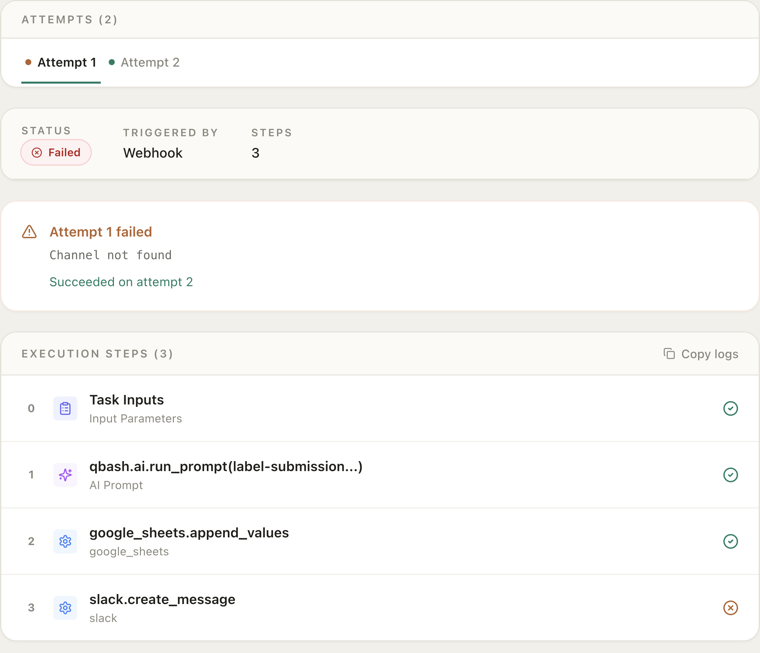
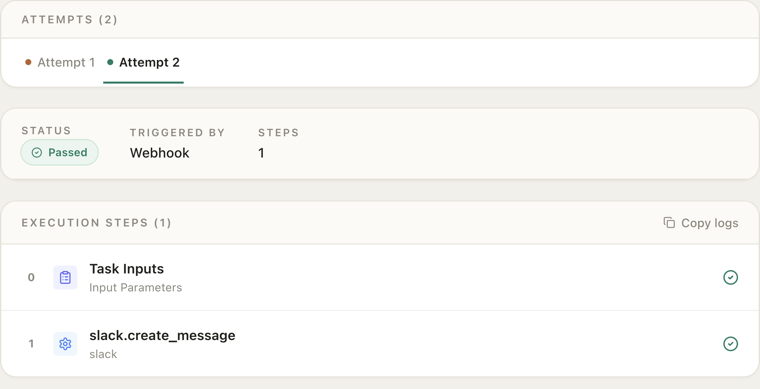
Tasks can be configured with checkpoints, saves, and auto retry, which reuses what the earlier attempt finished and runs only what is left. In this example, the final Slack message step failed. The automatic retry then sent the message and reused the saved prompt and Sheets results, avoiding duplicate rows and wasted tokens.
Questions
Who writes the Python?
The AI builder in the task editor can write it from the old workflow and an example input, and so can an agent such as Claude Code through the qbash MCP.
How does qbash pricing compare with Make’s credits?
Make counts non-AI operations as credits. qbash counts the whole Task run, including its connector calls and automatic retry attempts, toward the run allowance. Model usage is billed separately by the provider.
Can qbash import a Make scenario or a Pipedream workflow?
The task editor’s Import automation control gives source files to the AI builder to draft Python code. An agent using the qbash MCP can also draft a Task from the workflow’s code, instructions and an example input. The draft needs testing and accounts must be connected again.
Do connected accounts and API keys move over?
Credentials stay with the old platform, so each account is connected again in qbash and API keys go into Secrets attached to the Task.
Can a Task use pip packages such as requests or pandas?
Import lines are blocked in a Task, so code built on requests or pandas is rewritten with qbash.http.request for HTTP calls, qbash.parsers for CSV and Excel files and the preloaded standard-library modules.
Where does the state from a Pipedream data store go?
Pipedream’s export documentation confirms that data stores, event history and File Store files are excluded. Data needed by the replacement Task is downloaded separately and can be kept in Memories.
What happens to Node.js steps?
Tasks are Python, so a Node.js code step is rewritten in Python when the workflow moves.
The official qbash MCP lets Claude Code, Codex and Cursor build Tasks
The qbash MCP connects an AI coding tool to your qbash account. With the exported Pipedream workflow and an example input, Claude Code can build the Task, run its tests and read the log of a test run. It does this with tools such as build_task, run_tests, run_task and get_task_log.
Connect with OAuth
 ChatGPT
- 1In ChatGPT, go to SettingsApps & ConnectorsAdvanced settings and turn on Developer mode. Custom connectors depend on your plan and role. On a Business, Enterprise or Edu workspace, an owner or admin adds it first.
- 2Back in SettingsConnectors, click "Create", enter a name, paste
https://mcp.qbash.com/mcpas the MCP URL, and choose OAuth authentication. - 3Complete the qbash sign-in when prompted to authorize access.
- 4In a new chat, click the "+" icon, choose Developer mode, and select the server to enable it for that conversation.
A first Task can run beside the old workflow
The old workflow’s trigger stays on while the Task runs beside it. Once the Task’s test runs match the workflow’s results, the Task takes over.