Run long LLM and agent jobs in the background as hosted Python Tasks
qbash runs LLM and agent jobs outside your web request, with retries, checkpoints and step logs, so Vercel or Lambda request timeouts don’t cut the job short.

qbash Tasks combine automation, model calls, integrations, and memory
A Task is an AI cloud function written in Python that qbash hosts on secure cloud infrastructure.
- Inline prompts, with the model chosen per prompt
- Version control on every save
- A log of every step in every run
- Runs started from a webhook, the API, a schedule or the qbash MCP
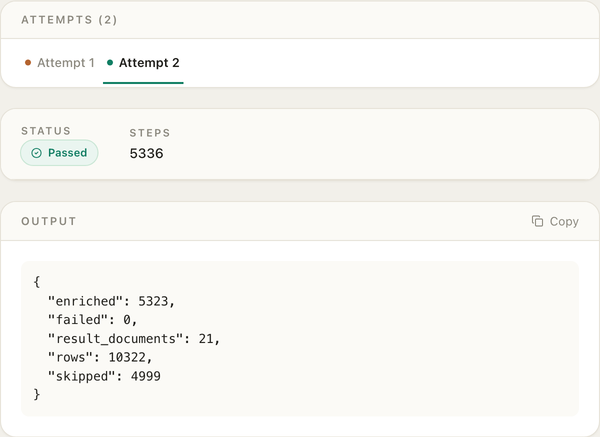
Our example company enrichment Task reads over 10,000 rows of company data from Memories, calls an inline prompt for each company’s industry and summary, saves the results in batches and posts the final counts to Slack
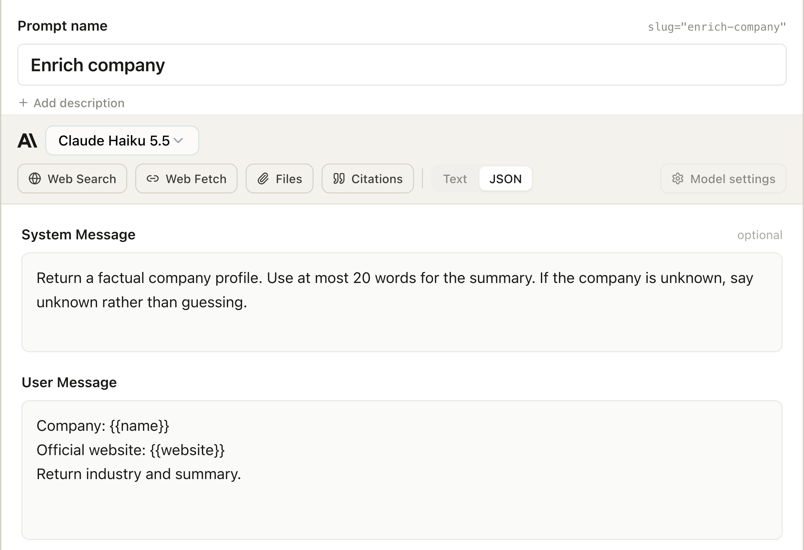
Checkpoints and parallel runs in the qbash Task SDK
The qbash Task SDK has two functions for long batches. qbash.parallel runs a function for each item in a list, with a limit on how many run at once and how many start each minute. qbash.checkpoint keeps each finished result for the run.
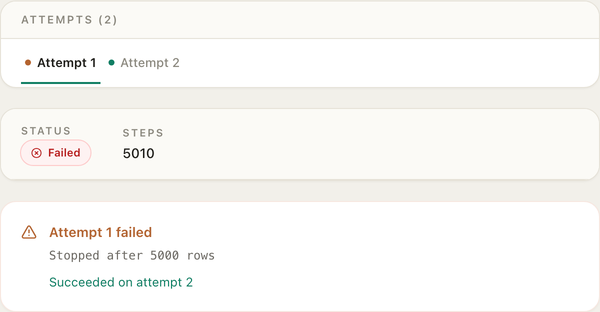
With auto retry enabled the new attempt reuses the rows that already finished. In this run, the first attempt stopped after 5,000 rows. The second attempt skipped the rows that had finished and enriched the remaining 5,323.
def enrich(row):
    profile = qbash.ai.run_prompt(
        "enrich-company",
        {"name": row["name"], "website": row["website"]},
    )
    return {**row, **profile}


result = qbash.parallel(
    enrich,
    batch,
    concurrency=20,
    max_per_minute=600,
    checkpoint="company-profiles",
    checkpoint_key="id",
    store_result=True,
    continue_on_error=True,
)
Triggers start qbash Tasks from apps, AI tools and services
A Task can have several triggers, set in its Settings under Triggers:
- Manual runs from the Task’s page in qbash
- The API, which returns the result in the same request
- The webhook, which answers at once and runs the Task in the background
- Schedules, at set times in a time zone you choose
- MCP servers, which make the Task a tool in ChatGPT, Claude, Codex and Cursor
- Events from Slack, Microsoft Teams, Telegram, Gmail, Outlook Mail, GitHub, Jira, Bugsnag, LinkedIn, Google News and SERP news monitoring
Webhooks suit applications whose request would time out. Your app can POST to the Task, and receive a run_id in return. When the Task is complete, qbash sends its status and result to a Callback URL.
A web app can keep the run ID and use the callback to display the finished batch.
curl -X POST "$WEBHOOK_URL" \
  -H "Content-Type: application/json" \
  -d '{"document": "companies.csv"}'

# 202 Accepted
{
  "status": "accepted",
  "entrypoint_run_id": "<run id>"
}
Questions
Does qbash replace Celery and Redis?
Your app starts the Task over HTTP and qbash runs it, which covers a job you would otherwise hand to a Celery worker. qbash has no enqueue call for application code, so jobs start from a webhook, the API, a schedule, a trigger or the qbash MCP.
Can a Task use the openai or anthropic Python packages?
A Task cannot import the openai or anthropic packages. Model calls go through qbash.ai.run_prompt, and other APIs go through qbash.http.request with keys stored in Secrets, or through a connector.
Can a TypeScript or Next.js app start a Task?
Any language can call a Task’s webhook or API endpoint over HTTP. The Task itself is written in Python.
Will a retry send the same email or write twice?
A retry runs main.py again, so a write with no guard can happen twice. A checkpoint keeps a finished result for the run, and an external write still needs an idempotency key or a check that it already happened.
Can a run wait days for an event or an approval?
A Task run does not wait on an outside event or a person’s approval.
How many runs can go at once?
Each Task has a Concurrent runs setting, and the account limit depends on the plan.
The qbash MCP connects coding agents to Tasks
Claude Code, Codex and Cursor can build Tasks, start runs and inspect their logs through the qbash MCP. dry_run holds back connector and memory writes while testing.
Connect with OAuth
 ChatGPT
- 1In ChatGPT, go to SettingsApps & ConnectorsAdvanced settings and turn on Developer mode. Custom connectors depend on your plan and role. On a Business, Enterprise or Edu workspace, an owner or admin adds it first.
- 2Back in SettingsConnectors, click "Create", enter a name, paste
https://mcp.qbash.com/mcpas the MCP URL, and choose OAuth authentication. - 3Complete the qbash sign-in when prompted to authorize access.
- 4In a new chat, click the "+" icon, choose Developer mode, and select the server to enable it for that conversation.
Run the next long LLM job as a qbash Task
Connect the qbash MCP, and Claude Code, Codex or Cursor can build the Task and call it.